Connect Gmail and approve your first intro
From connecting your account to sending the first draft in your approval queue.
This one takes about five minutes, and at the end of it you'll have sent your first intro. Let's go.
Open Integrations
In your workspace, click Integrations in the sidebar. Gmail's right at the top.
Connect Gmail
Click Connect, then Sign in with Google, and pick the account you raise from.
Google asks if Lenz can read your email and manage drafts. That's all Lenz asks for. Once you allow it, you land back in Lenz, connected.
Ask for an intro
Open your Investors table and click Ask Lenz. Ask for what you want, like "Draft intros to the three seed funds at the top of the list."
Lenz writes each one as a draft in your Gmail.
Review it in Approvals
Open Approvals. Your drafts are waiting there, each one showing who it's to.
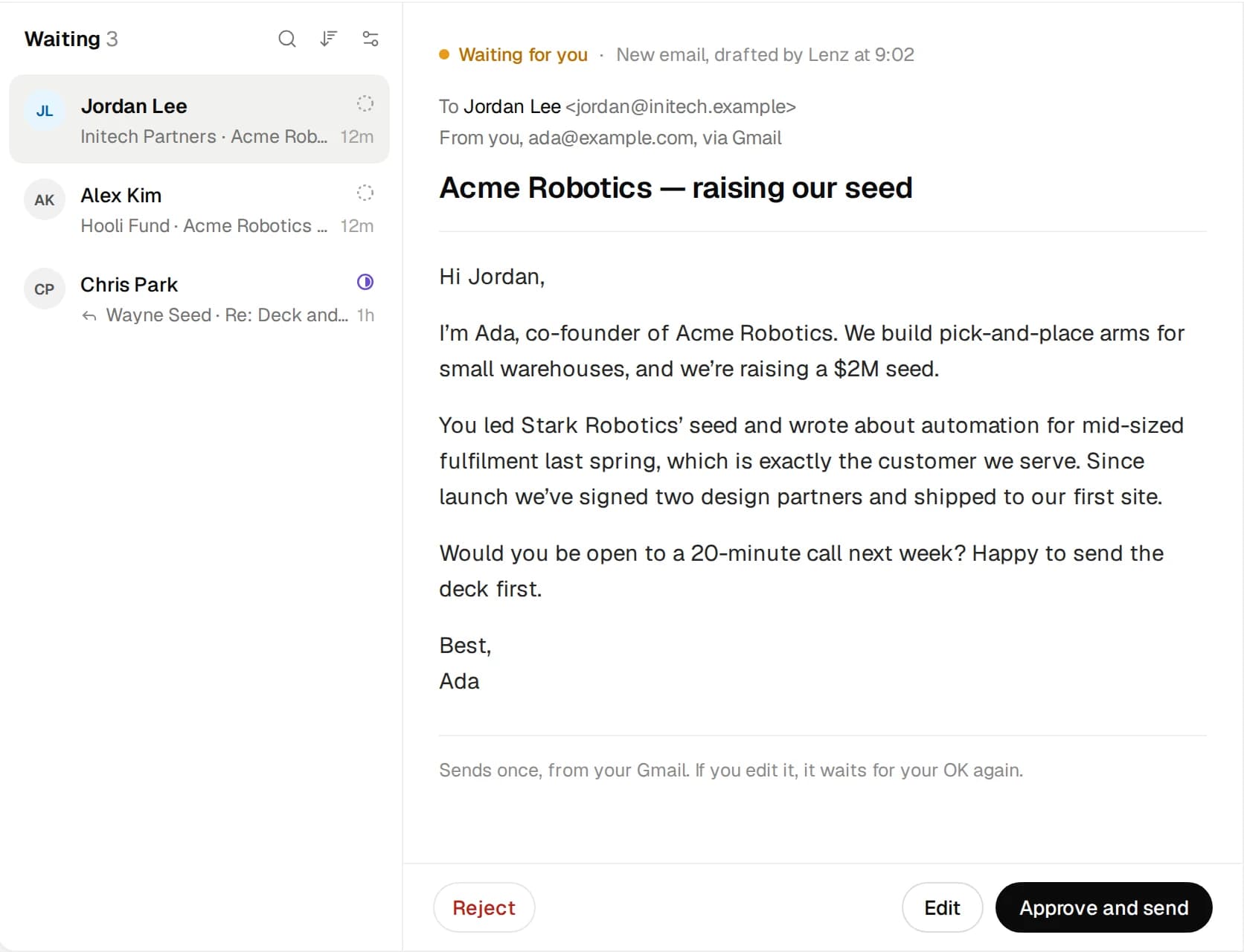
Read it over. Want to change something? Click Edit, make your changes and Save changes. When it looks right, click Approve and send. It goes from your Gmail, as you.